Upload SOVs through your Client Accounts page
To use the Client Accounts page, you must have a broker or carrier agreement with Archipelago.
Upload a New Account (Video)
Add an account through your Client Accounts page to create an Archipelago organization for your client and populate it with their SOV data.
The Client Accounts page is a place on platform where you can more easily upload and manage data for multiple clients.
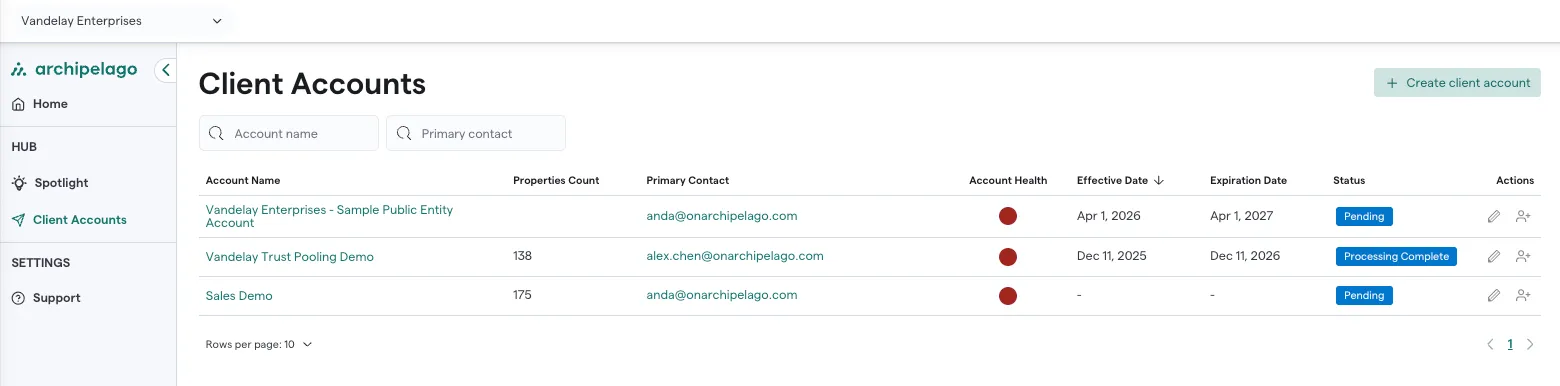
- Click on Client Accounts.
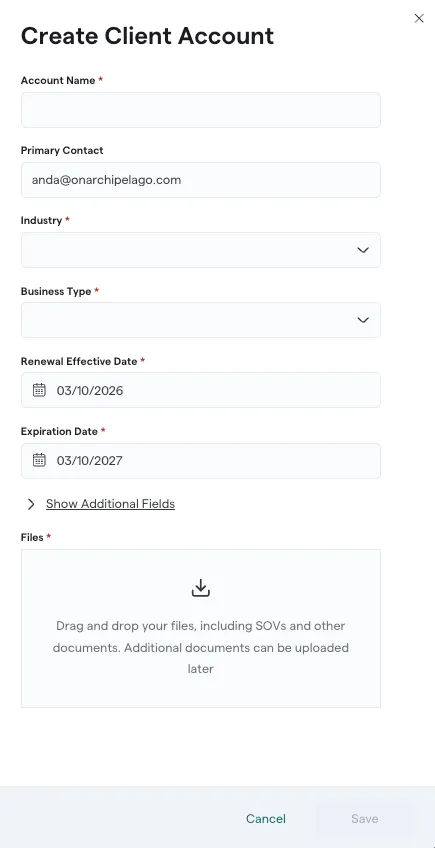
- Click Create Client Account.
- Fill out the fields with the information about the account you are adding.
- Scroll to the bottom. Under Files, drag and drop current and historical SOV documents, exposure and loss spreadsheets, and any other supporting documents. Additional documents can be added later.
- Click Save.
The page will confirm the documents have been submitted, and you'll receive an email confirmation.
After Archipelago processes this data, you'll receive another confirmation email and will be able to access the new organization from your Client Accounts page. You and your client can then interact with their data and manage properties, documents, and losses.
You can also edit an account to ensure information is up to date and to add any additional documents.